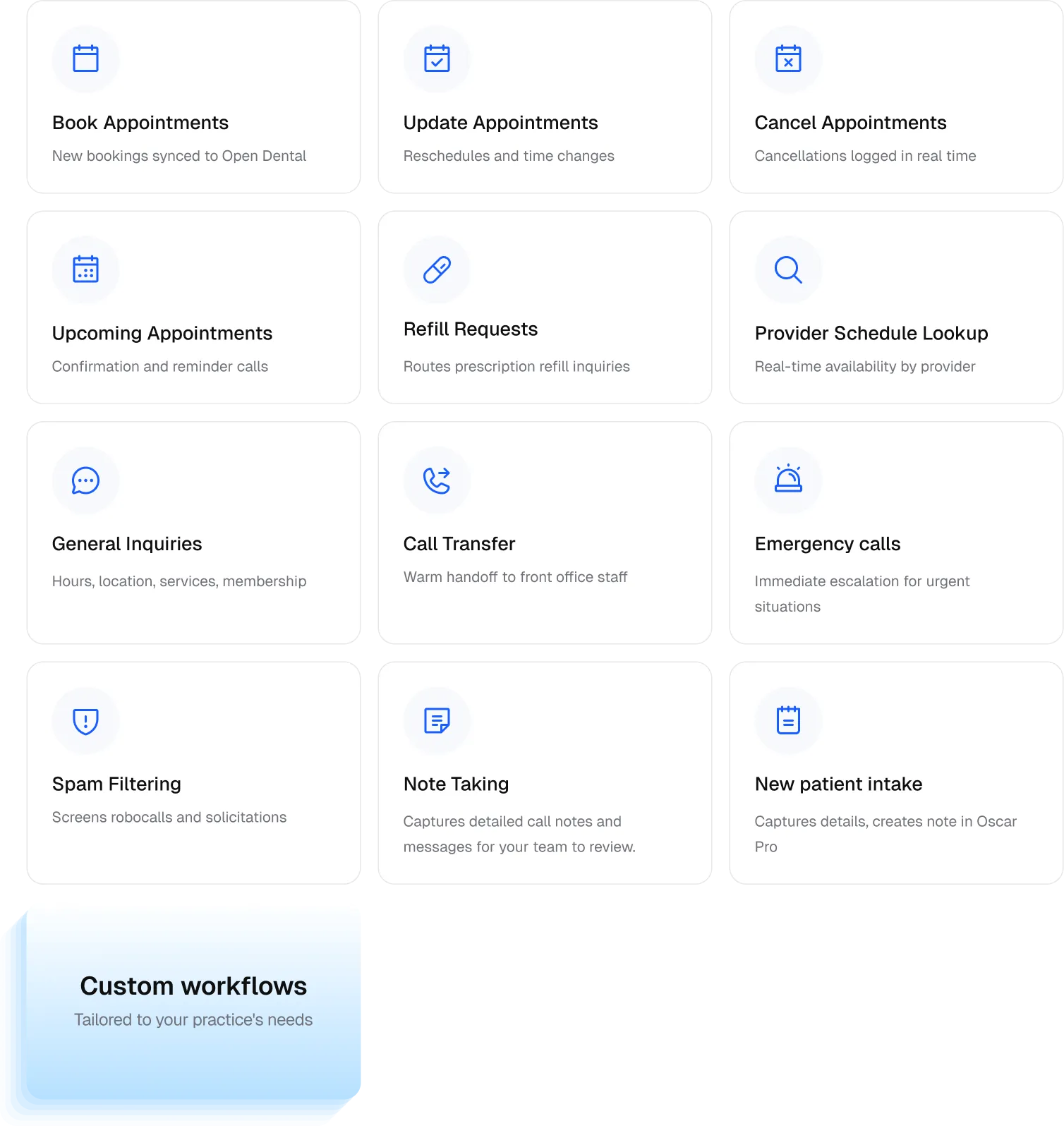
14+ Workflows Handled — Out of the Box
Every workflow below is live from day one — no setup scripts, no developer involvement required.
What Your Practice Gets with Kickcall + Cerbo
- An AI Receptionist That Speaks Cerbo's Language— Patients interact with your practice the same way they do today — booking, rescheduling, canceling appointments, and getting answers to routine questions without any change to their experience. From membership workflows to appointment types to provider schedules, Kickcall understands how Cerbo practices are structured.
- Live Cerbo Sync— Bookings, reschedules, and cancellations update in your Cerbo schedule in real time — no double entry, ever. One system, one source of truth.
- Handles Complex Workflows— Whether you run a DPC membership model, a functional medicine clinic, or a hybrid cash-pay practice, Kickcall adapts to how you operate.
- Voice-Ready Integration— Manages real-time provider availability, upcoming appointment slots, and complex scheduling rules without manual input.
- Agent Memory— Every call is personalized from the moment it begins. The AI receptionist already knows the context before the conversation starts.
- Spam Filtering — Block spam calls and reduce routine call volume by up to 80%, so your team can focus on patient care.
- Prescription Refill Routing— Patients call in for refills. Kickcall captures the request and notifies your team — no hold times, no voicemail.
- Smart Escalation— Critical and complex calls are seamlessly transferred to the right team member in real time with complete context.
- New Patient vs Existing Patient Workflows— Existing patients book appointments over the phone. New patients are guided through intake — their information is captured and a note is created in Cerbo for your team.
- Custom Workflows— Beyond the core integration, custom workflows are available on request, subject to API availability.
- 24/7 Call Coverage— Never miss a patient call, even after hours, on weekends, or during holidays.
- Telephony Integration— Kickcall integrates with your existing phone system and works alongside your telephony provider, whether you're using RingCentral, Vonage, Zoom Phone, Google Voice, or a local managed VoIP service provider.
- Natural Conversations— Patients can ask real questions like "What's the earliest available appointment?" or "Can I speak with my provider?" and get accurate, real-time answers.
- Multilingual Support— Automatically responds in the caller's language — 42+ languages and accents supported.
- More Revenue, Less Overhead— Fill more appointments without adding front office headcount.
Built for Healthcare, with Data Privacy at its Core
Functional medicine, direct primary care, and cash-based practices handle deeply personal patient information — and Kickcall is built to protect it. Kickcall is fully HIPAA and SOC 2 compliant, ensuring every patient voice interaction is encrypted, private, and audit-ready.
All voice interactions are end-to-end encrypted, and Kickcall's integration with Cerbo is secured to protect patient data at every step. For full details, visit security.kickcall.ai.
Simple Setup. Live in 48 Hours.
We handle the setup. You focus on your patients. Three steps and your Cerbo AI receptionist is answering calls.

Frequently Asked Questions
1. How does Kickcall connect with Cerbo?
Kickcall connects to Cerbo through a custom API integration, allowing us to securely connect with your Cerbo account.
2. Will Kickcall work with my existing phone system?
Kickcall integrates with your existing phone system and works alongside your telephony provider, whether you're using RingCentral, Vonage, Zoom Phone, Google Voice, or a local managed VoIP service provider.
3. Do I need to change my Cerbo workflows to use Kickcall?
No. Kickcall is built to work around how your practice already operates — it fits into your Cerbo workflows without any reconfiguration, staff retraining, or changes to your scheduling processes.
4. Can Kickcall handle prescription refill requests for Cerbo practices?
Yes. Kickcall routes prescription refill requests automatically — patients call in, Kickcall captures the request, and your team is notified without tying up the phone line.
5. How does Kickcall handle new patients vs existing patients?
Kickcall supports custom intake workflows. Existing patients can book appointments over the phone. New patients are guided through an intake flow — their information is captured and a note is created in Cerbo for your team to follow up.
6. Do I need to manually update Kickcall when my schedule changes in Cerbo?
No. Kickcall reads your schedule from Cerbo in real time. Any changes to provider schedules, operating hours, or appointment availability are automatically reflected in Kickcall. Simply update your schedule in Cerbo, and Kickcall stays in sync.
7. Is patient data handled securely?
Yes. Kickcall is fully HIPAA and SOC 2 compliant. All voice interactions are end-to-end encrypted. For full details, visit security.kickcall.ai.
8. How quickly can my practice go live?
Most practices are live within 48 hours. Kickcall connects to Cerbo with a no-code setup, and your dedicated account manager is with you every step of the way.
9. Is there a long-term contract?
No. There is no long-term contract — you can cancel at any time with no cancellation fees and no penalties.
10. Do you sign a Business Associate Agreement (BAA)?
Yes. Kickcall signs a Business Associate Agreement (BAA) upon request.