
September 14, 2026
Your OSCAR Pro Tickler queue isn't clinical work — it's phone work. Booking appointments, chasing missed visits, confirming tomorrow's schedule: none of it needs a physician's judgment, all of it needs a human on the phone, and that's where most Canadian clinics get stuck.
Kickcall fixes this without adding another system to learn. It plugs into OSCAR Pro as its own assignable user — assign it a Tickler like you would an MOA, and it calls the patient, completes the task, and writes the outcome back on that same Tickler. Here's exactly how it works.
If you run a family practice on OSCAR EMR / OSCAR Pro anywhere in Canada — Ontario, British Columbia, Alberta, or beyond — every day your Tickler queue fills up with administrative work that has nothing to do with medicine and everything to do with reaching a human being on the other end of a phone line:
In most Canadian clinics, this work sits on the desk of one or two Medical Office Assistants (MOAs) — the same staff who are also checking patients in, managing faxes, and answering the front-desk phone. With MOA turnover high and hiring difficult in many provinces, Ticklers pile up, follow-ups get delayed, and physicians end up absorbing administrative risk they never should have carried in the first place.
Kickcall was built to close that gap directly inside the workflow you already use. Instead of asking your team to adopt a new system, Kickcall becomes a new user inside OSCAR Pro — one that receives Ticklers, makes the outbound calls, and reports back, exactly the way a receptionist would.
Kickcall's integration with OSCAR Pro is built around the tool your clinic already relies on for task management: the Tickler.
Inside OSCAR Pro's user list, Kickcall shows up as its own assignable user — for example, "User: Kickcall." A physician, nurse, or MOA assigns a Tickler to Kickcall exactly the way they'd assign it to a colleague. No separate login, no separate dashboard required for day-to-day use, no retraining your front desk on a new piece of software.
Because the entire loop happens on the Tickler itself, your clinic staff never have to leave OSCAR Pro or reconcile a separate Kickcall dashboard to understand what happened. The record of the call, the outcome, and any next step is right there in the chart's task history.
Workflow for Tickler Automation
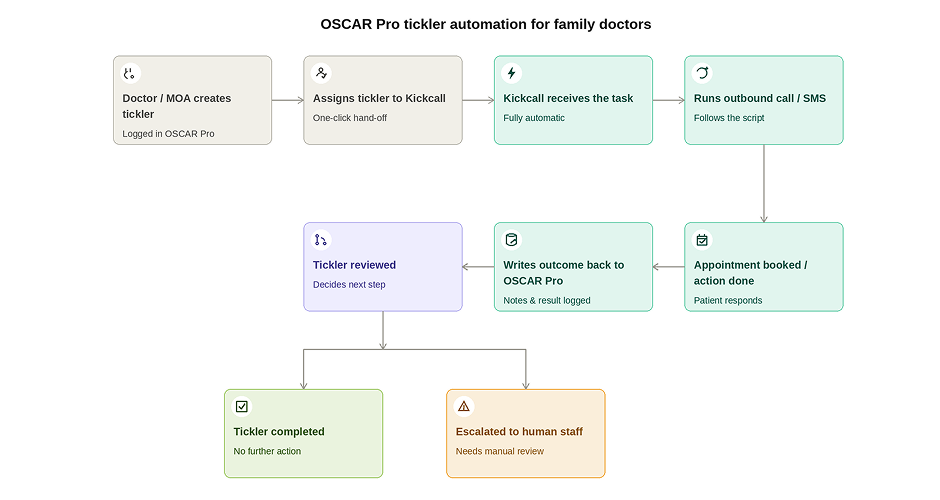
This is the distinction that matters most for Canadian clinics evaluating AI vendors: Kickcall doesn't just notify you that a call needs to happen — it places the call itself, on autopilot, triggered directly by the Tickler being assigned. Create the Tickler, and Kickcall takes it from there.
Kickcall's MVP is built around structured Tickler task types, so the AI agent always knows exactly what administrative job it's being asked to do — never guessing at clinical intent. Below is the full list your clinic can assign today.
Every Kickcall Tickler carries structured fields so the AI agent behaves predictably:
Required: Patient · Task Type · Due Date · Instructions Optional: Priority · Provider · Appointment Type · Location · Duration · Target timeframe · Preferred date/time · Contact method · Maximum call attempts · Additional instructions
Kickcall is intentionally designed not to guess at clinical intent. A Tickler like "Book a follow-up appointment with Dr. Smith within 2 weeks" is actionable. A bare instruction like "Call patient" is not — Kickcall will require meaningful instructions or route the task for clarification rather than improvising. For a Canadian clinic, this is the difference between a tool that reduces liability and one that creates it.
Priority levels
Tasks can be flagged Routine, Urgent, or ASAP, which directly affects queue position and how quickly Kickcall places the call.
Contact strategy
Each task supports Phone, SMS, or Phone + SMS, with configurable maximum attempts, retry intervals, voicemail handling, and callback logic — matched to how your clinic already prefers to reach patients.
This is one of the most important design decisions in the whole system, and it's the one most Canadian clinics ask about first: what happens when Kickcall can't reach the patient?
Kickcall never simply marks a failed call as completed. It returns a structured outcome for every task, for example:
APPOINTMENT_BOOKEDPATIENT_DECLINEDPATIENT_ALREADY_BOOKEDPATIENT_REQUESTED_CALLBACKPATIENT_UNREACHABLEVOICEMAIL_LEFTINVALID_NUMBERESCALATED_TO_STAFFReferral-specific and general outcomes follow the same pattern (REFERRAL_APPOINTMENT_BOOKED, REFERRAL_PENDING, SPECIALIST_UNREACHABLE, MESSAGE_DELIVERED, and so on).
Example: an unreachable patient
Attempt 1: No answer Attempt 2: No answer Attempt 3: Voicemail left Final outcome: Escalated — Unable to reach patient after 3 attempts.
Depending on your clinic's configuration, Kickcall will either keep the Tickler open or complete the Kickcall portion and automatically create/escalate a new task for your human staff. The recommended default is to escalate to a real person after the configured number of attempts — Kickcall is built to hand off, not to quietly let a patient fall through the cracks.
After the workflow finishes, Kickcall updates the original Tickler with a clear, human-readable outcome — no separate dashboard required to understand what happened.
Original Tickler:
Kickcall — Referral accepted: book patient appointment
Completed outcome (written back automatically):
Completed — Patient reached and appointment booked for September 18, 2026 at 2:00 PM with Dr. Smith.
Unsuccessful attempt:
Escalated — Patient could not be reached after 3 attempts. Voicemail left.
This is the closest an AI system gets to acting like an actual MOA: it picks up the assigned task, does the work, and reports back on the exact same Tickler, in plain language your physicians and staff can read at a glance.
Every Kickcall Tickler maintains a complete, timestamped record:
For Canadian clinics operating under provincial privacy legislation (like PHIPA in Ontario or equivalent frameworks elsewhere), this level of auditability matters — every patient contact attempt made on the clinic's behalf is logged and traceable back to the originating Tickler.
Kickcall is designed to know the edges of its own job. It escalates automatically when:
Example escalation note written back to OSCAR Pro:
Kickcall → Staff Escalation: Patient wants to speak with the clinic regarding an issue outside the appointment-booking workflow.
This means Kickcall functions less like a rigid script and more like a properly trained junior staff member — it does what it's confident doing, and it hands off the rest, with full context, instead of guessing.
Everything above describes Kickcall's OSCAR Pro Tickler integration specifically — but Ticklers are just the first workflow, not the whole product.
Kickcall is architected as a general-purpose administrative automation layer for your clinic. The same structured-task-and-outcome model that powers appointment booking, referral follow-up, and recall can be pointed at any repetitive, phone-and-messaging-based administrative workflow your practice runs — today or in the future. The task-type architecture is deliberately extensible, so new workflows can be added without redesigning the underlying system.
In practice, that means the value of Kickcall compounds over time: start with the highest-friction Tickler types (referrals, missed appointments, recalls), then expand into whatever other business-specific outbound workflows are eating your staff's day — because Kickcall was built from the ground up to automate your clinic's specific processes, not a fixed, one-size-fits-all script.
OSCAR Pro already gives your clinic a task system your team understands. Kickcall doesn't ask you to replace it — it plugs an AI-powered outbound-calling team member directly into it. Assign a Tickler to Kickcall the same way you'd assign it to your MOA, and Kickcall will contact the patient, complete the workflow, report back on that exact Tickler, and escalate to your human staff whenever the job calls for a real person.
That's the whole point: administrative work gets done consistently, physicians stop absorbing follow-up risk, and your front desk gets its time back — without adding another system for your team to learn.
Yes — OSCAR Pro supports setting a default recipient for Ticklers. Your clinic can configure recurring, high-volume Tickler types like recalls or appointment confirmations to default straight to Kickcall, so staff don't have to manually reassign the same task type every time it's created.
Yes. Kickcall doesn't get special treatment in the queue — if a Tickler assigned to Kickcall passes its due date before being worked, it turns red and shows overdue exactly the way it would for any staff member. That visibility is intentional: your team can spot a stuck Kickcall task the same way they'd spot one sitting on an MOA's desk.
Kickcall pulls from the specific instructions on the Tickler itself, so any standardized wording your clinic has already set up through Suggested Text carries through into what Kickcall says on the call or text — you're not maintaining a separate script library for Kickcall.
Each Tickler is treated as its own structured task with its own outcome — Kickcall works them independently rather than merging them into a single call, so your audit trail stays clean per-task even if a patient has multiple things in progress.
Kickcall writes the escalation outcome onto the original Tickler and either keeps it open or triggers a new task for your staff, depending on how your clinic has it configured — the recommended default is auto-escalation to a person after the configured attempt limit, so nothing sits silently past due.
Yes. Because Kickcall is just another assignable user, staff can reassign a Tickler away from Kickcall at any point the same way they'd reassign it from one colleague to another — nothing about the Kickcall workflow locks a task in.
Kickcall works with Ticklers regardless of where they were created — schedule, patient Master Record, eChart, or Inbox (where it appears as "Task"). If it's assignable to a provider, it's assignable to Kickcall.
Yes — the same filtering your clinic uses to view Ticklers by assignee works for Kickcall too, so you can pull up exactly what's in its queue at any time without a separate dashboard.

Book a session with Kickcall to see how responsible AI can power your next step in customer communication.