A Communication Layer

AI Receptionist That Handles Your Front Desk

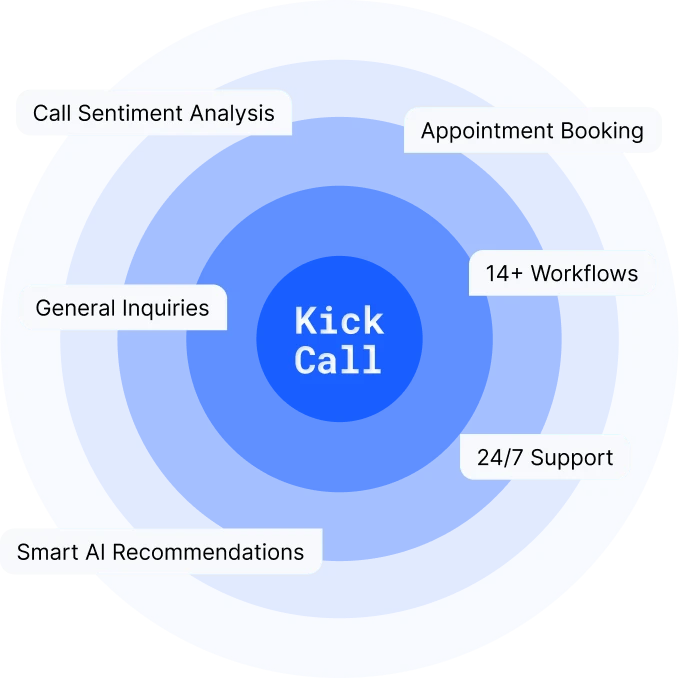
Kickcall manages inbound and outbound calls, chat, and SMS in multiple languages—then works inside your connected systems to book, update, follow up, or bring in your team.

Book Free Demo
AI-Powered
Kickcall AI Receptionist
Active
Inbound / Outbound
Calls
SMS
Caller Sentiment
Spam Filtering
AI Recommendation
VIP Routing
Deeper integration
EHR / EMR
PMS
CRM
Telephony
Workflows
Bookings
Rescheduling
Reminders
+ 14 more
Human escalation
Live transfer
Callback with context
More Than Answering

A Conversation Layer Connected to the Work Behind It

A useful receptionist does not stop at “hello.” Kickcall understands the request, uses approved business context, completes supported actions, and keeps people involved where judgment matters.

01 · Understand

Capture Intent and Context

Recognize why someone contacted you, what they need, and the details required to continue.
02 · Connect

Read Authorised System Data

Read relevant availability, records, services, locations, or account context through supported integrations.
03 · Complete

Take the Next Approved Action

Book, reschedule, collect information, send a message, update a record, or start outbound follow-up.
04 · Escalate

Bring in the Right Person

Transfer urgent or sensitive conversations and create contextual tasks when human attention is needed.
One Receptionist, Every Channel

Inbound Service and Outbound Work Stay in One Conversation History.

Callers can get immediate help. Your team can also launch approved outbound reminders, recalls, recovery, and follow-up—while chat and SMS preserve continuity.
Calls
Inbound & outbound
Chat
Website conversations
SMS
Two-way follow-up
Inbound
Answer questions, identify intent, schedule, route, capture details, and support after-hours demand.
Outbound
Run reminders, recalls, no-show recovery, waitlist outreach, intake follow-up, and approved campaigns.
Multilingual
Serve people in supported languages while keeping workflow rules, summaries, and outcomes consistent.
Human handoff
Transfer live or assign a callback with the conversation summary, urgency, and next action attached.
Deeper Integration

The conversation can continue inside your systems

Kickcall can connect with EHR, EMR, PMS, CRM, scheduling, telephony, and other business tools. It works with approved data and actions instead of leaving staff to re-enter every outcome.
Available reads, write-backs, triggers, and real-time actions depend on API access, permissions, and your configuration. Kickcall confirms feasibility before launch.
Discuss your system

EHR / EMR / PMS

Telephony

01

During the Conversation

Approved context is read from your systems, and bookings or updates happen live.

02

After the Conversation Completes

Actions written straight into your EHR / EMR / PMS

Communication Log

Every call, chat, and SMS is logged to the right record.

Appointment Note

Reason, changes, and outcome placed on the correct visit.

Team Task in Your System

Created inside the EHR/EMR/PMS wherever a human needs to step in.

Chart note

Structured notes added to the record without re-typing.

Service recommendation

Relevant next services flagged for staff review when appropriate.

Launch Faster with 18+ Prebuilt Call Workflows

Your AI receptionist comes pre-trained on the workflows practitioners use every day, with more being added regularly.

New Customer Intake

Existing Customer Matching

Family Booking

Provider Schedule Lookup

Book Appointments

Upcoming Appointments

Recall Reminders

Update Appointments

Cancel Appointments

Call Transfer

SMS (Two way)

General Inquiries

Administrative Calls

Refill Requests

Emergency Call Handling

Note Taking

Payment collection

Spam Filtering

Don't see a workflow you need? We'll build it for you.

Try Agent Before You Buy
Try me
Clear Operational Transparency

Your Clinic Runs On Calls. Now See the Full Picture.

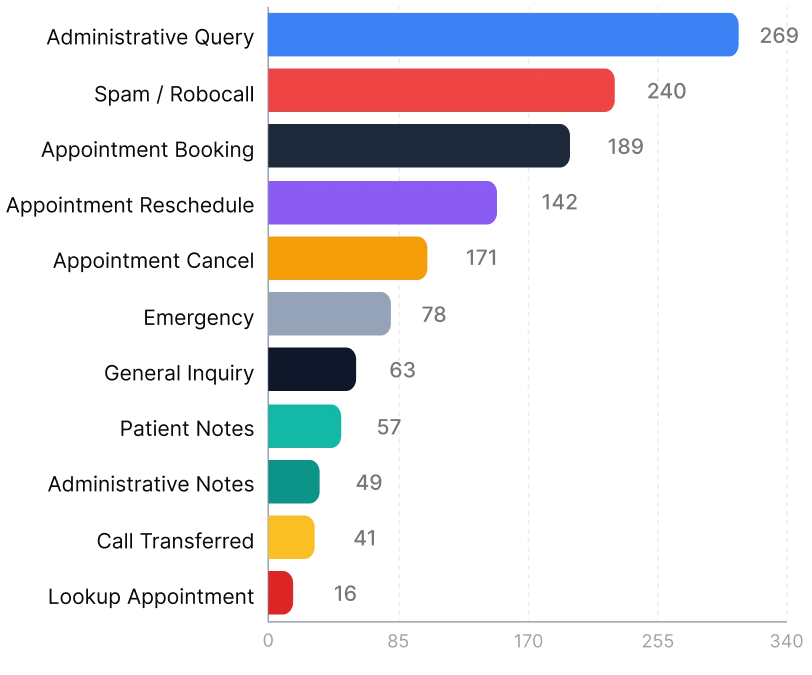
Without clear data, you're guessing—how many calls you missed, how much time you saved, or how your system is performing. Kickcall gives you complete visibility.
120+
Total hours saved
2m 14s
Average call duration
340
After-hours calls handled
1,847
Total calls answered

Call Workflow Breakdown

Total Answered

1,096

Assistance Workflows

800

Opportunity Workflows

296

Task Completed

64

Service Demand

Track requested services, unmet needs, and questions about offerings you do not yet provide.

Staff Performance Patterns

Review what callers say about service experiences and identify coaching opportunities.
AI Signals

Turn conversations into the insights you choose to track

Define the signals that matter to your business. Kickcall can analyze approved conversations and surface patterns without asking someone to listen to every recording.

Built around your question
“Which new services are people asking for?” and “What are callers saying about a new staff member?” become trackable operational questions.

Conversation Topics

See recurring themes, objections, concerns, and reasons people contact your business.

Custom Signals

Define your own categories, conditions, and summaries around the questions your business needs answered.
AI Recommendation

Know What Your Knowledge Base Is Missing

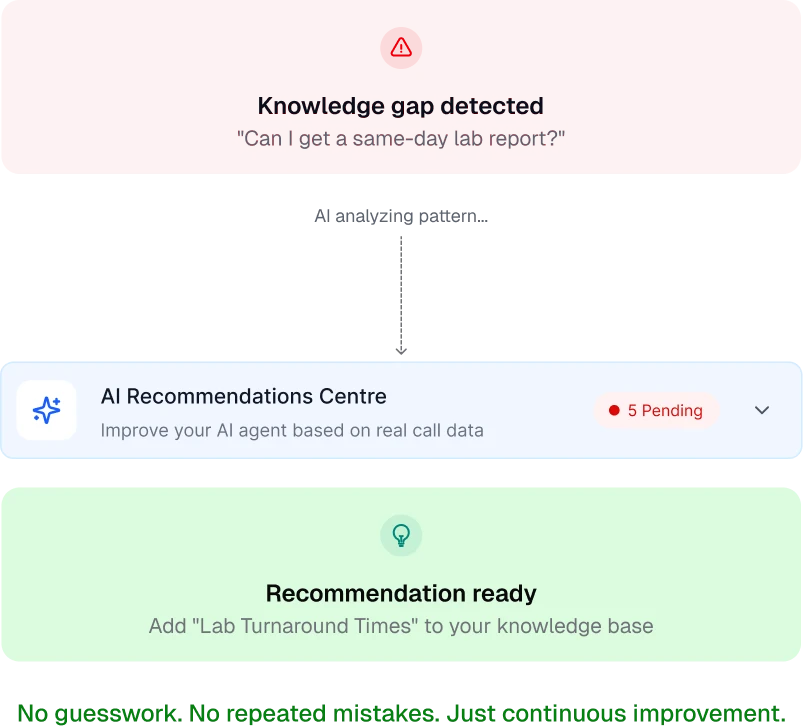
Every conversation also tells you what your business does not cover yet. Kickcall surfaces questions your current knowledge base could not fully answer, so you can decide what to add next.
From gap to decision
A repeated question about a service you have not listed becomes a clear candidate for your next update—not a lost caller.
Discuss your system
Unanswered questions
Spot what customers asked that your approved content could not answer completely.
New service demand
See services people request that are not yet part of your offerings or scheduling options.
Repeated questions
Identify questions asked again and again that deserve a clearer or more complete answer.
Business Info to Add
Turn recurring gaps into concrete updates for your FAQ, services list, or knowledge base.

Built for Businesses That Run on Calls

An AI receptionist is built for businesses that rely on phone calls to answer questions, book appointments, capture requests, and connect customers with the right person.

How We Take You Live

From Your Front Desk Workflow to Production in Five Steps

Your team knows what the AI will handle, which systems it can use, when a person steps in, and how outcomes will be reviewed before launch.

This process may sound long, but in 90% of cases we go live the same day
01
01
Understand Your Workflows
Map inbound and outbound conversations, business rules, languages, and human exceptions.
02
02
Build and Integrate
Configure channels, conversation paths, knowledge, and supported system actions.
03
03
Security Check
Review permissions, data handling, escalation, recording, and communication requirements.
04
04
Pilot and Launch
Test real scenarios, review outcomes, tune responses, and activate a controlled production launch.
05
05
Ongoing Support
Monitor quality, improve workflows, add signals, and expand channels or locations with support.

Integrations 100+ tools

Kickcall ensures smooth data flow and collaboration.

Therapy iQ PMS

AI Voice Receptionist for Therapy iQ PMS Users

VetlinkPRO PMS

AI Voice Receptionist for VetlinkPRO PMS Users

TotalMD

AI Voice Receptionist for TotalMD Users

Cliniciel PMS

AI Voice Receptionist for Cliniciel PMS Users

Akitu One PMS

AI Voice Receptionist for Akitu One dental practices

AdvancedCare EHR

AI Voice Receptionist for AdvancedCare EHR Users

See All Integrations

Frequently Asked Questions

What does an AI Receptionist do?

Is Kickcall only a call-answering service?

Can it make outbound calls?

Does the AI Receptionist support multiple languages?

Can a caller reach a person?

What can we see in the dashboard?

What are AI Signals?

Compliance Certification

We have compliance certifications and protocols in place to ensure that every single interaction is private and secure.
Book Free Demo

Ready to Add AI Voice to Your Business with Kickcall?

Automate calls, handle more customers, and grow — with zero disruption to your current setup.

Icon

24/7 Call Handling

Icon

Multilingual Support

Icon

Live Call Transfer

Icon

Smart Appointment Booking

Icon

Auto-Sync Knowledge Base

Icon

AI-Powered Receptionist

Icon

Custom Integrations

Icon

Secure & Scalable

Icon

White-Label Ready

Icon

Analytics Dashboard

Icon

Spam Call Detection

Icon

Dedicated Technical Manager

Icon

AI Agent Builder

Icon

Real-Time Slack Support

Icon

VoIP-First Architecture

Icon

Customer Support

Icon

Workflow Automation

Icon

Data Security

Icon

Intelligent Scheduling

Icon

Advanced Reporting

Icon

Lead Scoring

Icon

Customer Support

Icon

Workflow Automation

Icon

Data Security

Icon

Intelligent Scheduling

Icon

Advanced Reporting

Icon

Lead Scoring