Deeply Integrated AI Receptionist for OSCAR Pro: A Workflow-by-Workflow Guide for Canadian Clinics
```html
AI Blog Summary - Get the key insights from this blog in seconds.
Quick answer:Kickcall is an official OSCAR Pro integration partner that connects directly to a clinic's existing OSCAR Pro account. It answers and places patient calls for routine, repeatable front-desk work — no-shows, recalls, referrals, ticklers, lab-result follow-ups, refill requests, and more — and writes the outcome of every call (a booking, a note, a resolved tickler) back into OSCAR Pro in real time. It does not replace clinical judgment; anything clinical or ambiguous is escalated live to a human.
If your clinic runs on OSCAR Pro, you already know the pattern: the phone rings, a medical office assistant (MOA) stops whatever they're doing, and spends two to five minutes on something that isn't clinical care — confirming a no-show, chasing a referral report, reminding a patient about a recall, or checking whether a form came back. Multiply that by dozens of calls a day and it's easy to see why front desks get overwhelmed and patients get put on hold.
This post is a practical breakdown of the patient-touchbase workflows Kickcall runs for OSCAR Pro clinics: what triggers each one inside OSCAR Pro, what happens on the call, and what gets written back to the chart. Every workflow below is described the way it actually functions — not as a generic feature list — so a clinic manager, physician, or MOA can verify it against how their own OSCAR Pro instance works.
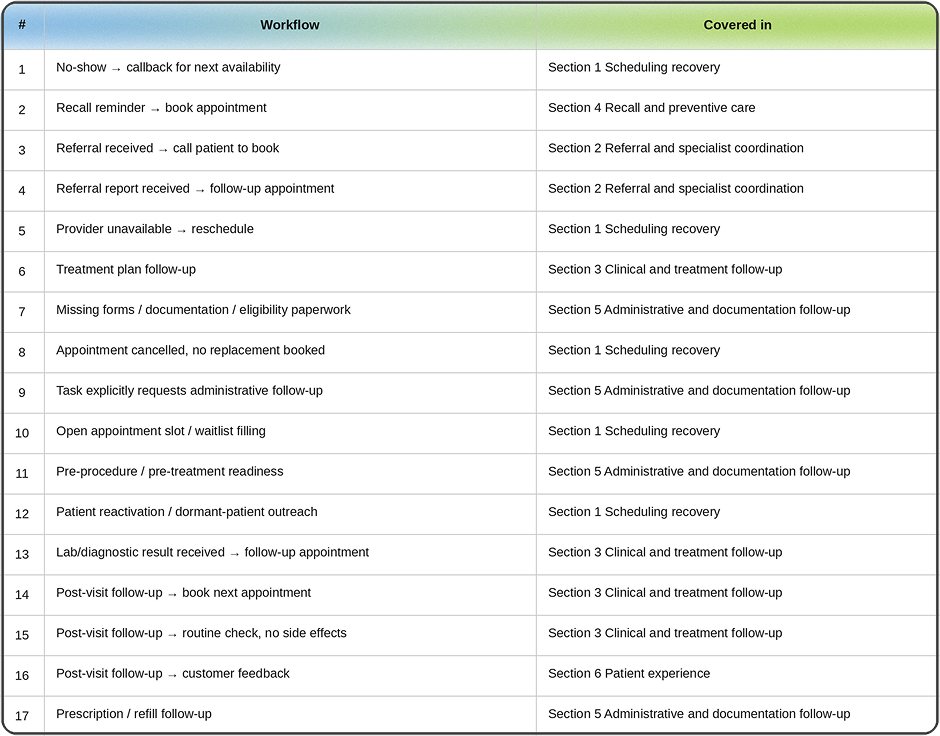
Coverage checklist
Workflows are grouped by theme below rather than kept in a flat numbered list, so here's a direct map — every scenario a clinic asked us to cover, and exactly where it's addressed:
Coverage checklist
What is OSCAR Pro, and what is Kickcall?
OSCAR Pro is a managed, commercially supported version of OSCAR EMR — Canada's best-known open-source electronic medical record — operated by WELL Health and certified by OntarioMD. It's used across family medicine, primary care, and specialist clinics nationwide, and it's interoperable with provincial systems like the Ontario Laboratory Information System (OLIS) and Hospital Report Manager (HRM), alongside scheduling, billing (including OHIP and WSIB claims), eForms, and its tickler (task/follow-up) system.
Kickcall is an AI voice receptionist and administrative-automation platform. For OSCAR Pro clinics specifically, Kickcall is listed as a verified integration on OSCAR Pro's own integrations page, meaning the connection is recognized and supported rather than a third-party workaround.
Keeping these two definitions distinct matters: OSCAR Pro is the system of record; Kickcall is the voice layer that talks to patients and keeps that record current without staff having to place every call themselves.
1. Scheduling recovery — keeping the calendar full without staff chasing it
Direct answer: When an OSCAR Pro appointment slot is at risk of going empty — a no-show, a cancelled provider day, a last-minute cancellation, a dormant patient — Kickcall places the outreach call and rebooks in real time, instead of that slot sitting open until someone notices.
No-show → callback for next availability
Trigger in OSCAR Pro: A patient is marked as a no-show on a provider's schedule.
Kickcall's action: An outbound call goes out the same or next business day, acknowledging the missed appointment and offering the next available slots pulled live from that provider's calendar.
Written back to OSCAR Pro: A rebooked appointment, or — if unreachable — a note documenting the outreach attempt, so staff aren't chasing it blind.
Provider unavailable → reschedule
Trigger: A provider blocks time off, calls in sick, or a clinic day is cancelled.
Kickcall's action: Every patient booked in that window is called, told the appointment needs to move, and offered alternate slots.
Written back: New bookings land directly in the schedule; unreachable patients are flagged for staff follow-up.
Appointment cancelled with no replacement booked
Trigger: A patient cancels in OSCAR Pro and the slot reverts to "open" with no one rebooked into it.
Kickcall's action: An outbound call goes out to the clinic's waitlist (or a defined "wants an earlier appointment" list) the same day, before the slot is simply absorbed as lost time.
Written back: Either the slot is refilled, or — if no one is available — a note documenting the attempt, so staff know it was actively worked rather than missed.
Open appointment slot / waitlist filling (general capacity management)
Trigger: This is broader than a single cancellation — it covers any unused capacity the clinic wants worked proactively: a provider adds extra hours, a recurring gap in the schedule, or a standing waitlist a clinic wants called down on a set cadence rather than only reactively after a cancellation.
Kickcall's action: Kickcall works the waitlist against live OSCAR Pro availability on whatever cadence the clinic sets — daily, weekly, or triggered by a threshold of open capacity.
Written back: Bookings land directly in the schedule as slots are filled; the waitlist itself is updated so staff can see who's been contacted and who hasn't.
Patient reactivation / dormant-patient outreach
Trigger: A patient has no visit or contact logged past a threshold the clinic sets (commonly 18–24 months, relevant for rostered family medicine patients under capitation or LFP billing models).
Kickcall's action: An outbound check-in confirming the patient is still with the practice and offering a booking if they're due for anything.
Why it matters practically: For rostered/capitated practices, an inactive roster patient still counts against panel size — reactivation outreach is as much a roster-management task as a patient-care one.
2. Referral and specialist coordination
Direct answer: OSCAR Pro is used on both the referring and the receiving end of a specialist referral — Kickcall closes the loop on both sides by calling the patient the moment the referral or the consult report lands in the chart.
Referral received from another provider → call patient to book
Trigger: An incoming referral document or eForm is logged in OSCAR Pro, typically assigned to a tickler.
Kickcall's action: Outbound call confirming the referral was received and booking the first available consult slot.
Written back: The booking is added to the calendar and the referral tickler is updated as actioned, instead of sitting open in a queue.
Referral/consult report received from a specialist → follow-up appointment
Trigger: A consult letter or report returns into OSCAR Pro from the specialist and is assigned to the referring provider's tickler.
Kickcall's action: Outbound call letting the patient know their results are ready to review and booking the follow-up.
Written back: Follow-up appointment booked; tickler marked as addressed.
3. Clinical and treatment follow-up (structured, low-risk, escalation-first)
Direct answer: These are scripted check-ins with a narrow scope — confirming adherence, booking a recheck, or asking simple screening questions — not diagnostic conversations. Any response outside the expected range routes straight to a human.
Treatment plan follow-up
Trigger: A care plan note specifies a follow-up interval (e.g., "recheck in 4 weeks").
Kickcall's action: Outbound call at that interval to check adherence and book the recheck.
Lab or diagnostic result received → follow-up appointment
Trigger: A result lands in OSCAR Pro — including via the OLIS feed — and the provider flags it for patient follow-up.
Kickcall's action: Outbound call informing the patient results are ready to discuss and booking the appointment. Kickcall does not disclose result values on the call — only that a review is needed.
Post-visit follow-up → book next appointment
Trigger: A visit note specifies a next-visit interval.
Kickcall's action: Outbound call at the right time to book it, using live availability.
Post-visit follow-up → routine wellness check (no issues reported)
Trigger: A recent minor procedure, treatment, or new prescription has a standard check-in step.
Kickcall's action: A short, structured call asking simple screening questions.
Safety boundary: Any reported symptom, side effect, or hesitation in the patient's answer escalates the call live to clinical staff. This workflow only logs a call as "routine" when the patient's answers are unambiguous — it does not attempt clinical assessment.
4. Recall and preventive care
Direct answer: Recall reminders are one of the highest-volume, highest-return workflows because OSCAR Pro's recall/tickler logic already knows exactly who is due for what — Kickcall just closes the gap between "flagged as due" and "actually booked."
Recall reminder + book appointment
Trigger: OSCAR Pro's recall logic flags a patient as due — a Pap test, immunization, chronic disease management review, periodic health exam, and similar.
Kickcall's action: Outbound recall call explaining what's due and booking it during the same call.
Written back: Direct booking; recall is marked complete rather than quietly expiring on a list nobody works through.
5. Administrative and documentation follow-up (Canadian-specific)
This is the category most worth adapting for a Canadian audience specifically. Canadian clinics don't chase "insurance eligibility" the way U.S. practices do — most patients are covered by provincial health insurance (OHIP, MSP, AHCIP, and similar). What Canadian clinics actually chase is missing health card information, incomplete eForms, WSIB paperwork, extended-health-benefit forms for allied specialists (physiotherapy, chiropractic, psychology), and general OSCAR Pro tickler/task follow-up.
Patient needs to complete or return forms/documentation
Trigger: An eForm, intake package, WSIB form, or extended-benefits form is incomplete in OSCAR Pro, or a health card needs revalidation.
Kickcall's action: Outbound reminder call explaining exactly what's missing and how to submit it.
Written back: A chart note plus an update to the associated tickler or task.
Task explicitly requests administrative follow-up
Trigger: A provider or staff member creates a tickler or task in OSCAR Pro tagged for patient outreach — e.g., "call patient re: OHIP renewal," "confirm address on file."
Kickcall's action: Kickcall works the task queue directly, calling patients for whatever the task specifies, and resolves the task once complete.
Why this is the most direct pipeline: This is the closest one-to-one mapping in the whole list — tickler in, phone call out, tickler resolved — which is why we're covering OSCAR Pro ticklers specifically in the next post in this series.
Pre-procedure / pre-treatment readiness
Trigger: An upcoming procedure or minor treatment has prep instructions attached (fasting, medication pause, consent, arranging a driver).
Why it matters practically: Same-day cancellations caused by a patient simply not being prepared are one of the more avoidable sources of lost chair/room time.
Prescription / refill follow-up
Trigger: Inbound patient call requesting a refill, or a refill due-date flag in the chart.
Kickcall's action: Captures the request — medication, pharmacy, patient details — and routes it to the MOA or provider for approval.
Important boundary: Kickcall does not authorize prescriptions. It is strictly a capture-and-route step; the clinical decision stays with the provider.
6. Patient experience
Post-visit feedback
Trigger: A visit is completed and closed in OSCAR Pro.
Kickcall's action: A short, optional follow-up asking how the visit went.
Written back: Feedback is logged; anything genuinely negative or concerning is escalated rather than filed away.
Why this holds together logically, not just operationally?
Every workflow above follows the same chain: something changes inside OSCAR Pro → that change should trigger a patient conversation → the conversation should update OSCAR Pro again. Before an integration like this, clinics ran that loop by hand, which is exactly where it breaks — a tickler sits unread, a no-show never gets called back, a lab-result follow-up only surfaces at the next unrelated visit. Kickcall's role is narrow and specific: make sure that loop closes every time, in real time, without adding headcount, and hand off to a human the moment a call needs clinical judgment.
FAQ
1. Is Kickcall officially supported by OSCAR Pro, or is this a third-party workaround?
Kickcall is listed as a verified integration partner on OSCAR Pro's own integrations page, meaning the connection is recognized by OSCAR Pro rather than built through unsupported scraping.
2. Does Kickcall replace front-desk staff?
No. It absorbs routine, repeatable call volume (recalls, no-show callbacks, refill capture, tickler follow-up) and escalates anything urgent, clinical, or ambiguous to staff with full context. MOAs still handle in-person patients, complex calls, and clinical judgment calls.
3. Does Kickcall diagnose or give clinical advice on calls?
No. Its post-visit and lab-result workflows are scripted, narrow, and escalation-first — any symptom, side effect, or unclear answer is routed to a human rather than assessed by the AI.
4. Where is patient data stored?
Kickcall states that Canadian clinic and patient data is stored in Canada, with encryption in transit and at rest, under PIPEDA and SOC 2 Type 2 controls. Clinics should verify current certification and data-handling terms directly with Kickcall and their own privacy officer as part of onboarding.
5. How does a booking made on a call show up in OSCAR Pro?
In real time. There's no manual re-entry step and no separate system to reconcile against the chart — the booking is simply there.
6. What happens to prescription refill requests specifically?
Kickcall captures the request details and routes them to the MOA or provider for approval. It does not authorize refills itself.