AI Receptionist for Patient Payment Reminders

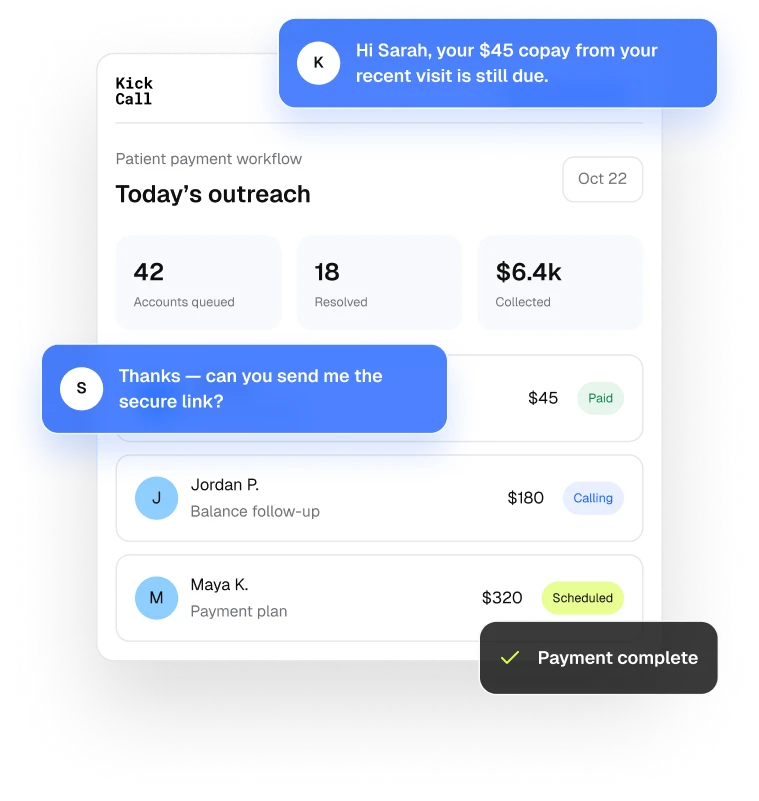
Kickcall automatically calls and texts patients about copays and outstanding balances, answers common billing questions, sends secure payment links, and writes every outcome back to your workflow.
Book Free Demo

Your Billing Team Can’t Follow Up With Every Patient

Sending a statement is easy. Getting every patient to understand and resolve it is the harder part.

Payment Follow-Ups Keep Getting Delayed

Busy billing teams struggle to follow up on every copay, overdue balance, and promised payment while managing their daily workload.

Patients Have Questions Before Paying

Patients may need clarification about charges, due dates, payment options, or insurance adjustments before they feel comfortable making a payment.

Language Barriers Make Billing Conversations Harder

Patients may prefer to discuss their bills in different languages. When they cannot clearly understand payment reminders or billing information, resolving balances becomes more difficult.

Every Account Needs a Different Approach

Copays, overdue balances, payment plans, and billing disputes require different follow-up steps based on each patient's account and situation.

Manual Tracking Adds to the Workload

Billing teams spend extra time documenting calls, updating account notes, tracking promised payments, and scheduling follow-ups manually.
Clock

Billing Calls Go Unanswered After Hours

Patients may have billing questions outside office hours, but the billing team may not be available to respond or explain the next steps.

How Kickcall’s AI Handles Payment Reminders, Step by Step

How Kickcall's Spam Filtering Actually Works — Step by Step. Kickcall doesn't check a number against a blocklist and hope it's still accurate. It answers the call and evaluates the conversation itself, in real time, before your team ever hears the phone ring. Here's exactly how it works.

01

Read the Patient Account

Before anything is sent, Kickcall checks the appointment, the copay, the balance, and the payment options your practice has approved. If the account isn’t ready, nothing goes out.

Appointment and balance details reviewed

Approved payment options attached

Patient account
Ready
SJ
Sarah Jenkins
Northside Family Practice
Verified
Appointment
Tomorrow · 10:00 AM
Provider
Dr. A. Reyes
Copay due
$40.00
Outstanding balance
$126.50
Approved options
Secure payment link
Two-payment plan
Balance verified
SMS consent on file

02

Reach Out at the Right Time

Reminders follow the schedule your practice sets—before the visit for copays, after the statement for balances—inside your outreach hours and only where consent allows.

Timing you define, not a default

Consent and channel checks before every send

Patient account
Ready
Configured outreach hours
8:00 AM–6:00 PM
Local time
3 days before visit
Copay reminder · SMS
Sent
2
1 day before visit
Friendly follow-up · SMS
Queued
3
Day of visit
Final reminder · SMS
Scheduled
Consent checked before every send

03

Answer, Remind, or Route

When a patient replies, Kickcall answers routine billing questions, resends a secure payment link, or offers an approved plan. Anything outside the rules goes to your team with context.

Answers drawn from approved practice information

Escalates with the full conversation attached

Patient conversation
Live
SJ
Sarah Jenkins
SMS · 4:06 PM
Balance: $126.50
Can I split the $126.50 into two payments?
Yes — your practice offers a two-payment plan of $63.25. I can send the plan details and a secure link, or have the billing team call you.
Send the link, please.

04

Record Everything That Matters

Every attempt, reply, link sent, and outcome is written back to the account in plain language, so the next person who opens it knows exactly where things stand.

Timestamped activity on each account

Outcomes and open follow-ups stay visible

Account activity
Synced
SJ
Sarah Jenkins
Patient account · Today
Follow-up open
4:00 PM
Reminder sent
SMS
4:06 PM
Patient replied
Payment-plan question
4:07 PM
Secure link sent
Two-payment plan
4:09 PM
Routed to billing
Requested a call
Activity written back to the patient account

Three Jobs, Handled Consistently

Kickcall is built around the payment conversations that repeat every week in a practice.

Collect Copays Before the Visit

A reminder goes out ahead of the appointment with the copay amount and a secure link, so the front desk isn’t collecting under time pressure at check-in.

Answer Every Billing Question Clearly

What a charge is, what’s still owed, and how a plan works—patients get a consistent answer from approved details, or a route to a person.
Clock

Turn Aging Balances Into Payment Plans

Older balances get scheduled follow-up and approved plan options are offered in the same conversation, instead of starting over with each statement.

What Payment Workflows Can Kickcall Follow Up On?

Configure distinct outreach and resolution paths for every common patient responsibility workflow.

Pre-visit copays

Collect expected patient responsibility before arrival with a secure payment link.

Aging balances

Prioritize older balances and follow your cadence for calls, text, and email.

Payment plans

Present only the terms and eligibility rules your practice has approved.

Past-due promises

Follow up at the agreed time without asking your staff to track another spreadsheet.

Statement questions

Explain dates, amounts, common adjustments, and payment methods in plain language.

750+ Business Integrations That Plug Into the Workflow

Payment workflows read appointments and balances from your EHR, EMR, or PMS and write outcomes back. Around them, 750+ business apps — payments, calendars, spreadsheets, messaging — plug into the same workflow. Which systems are available depends on API access, permissions, and workflow review.
Contact for Custom Integration
RingCentral
3cx
SkySwitch
NetSapiens
Vonage
VoIP.ms
Asterisk
NUACOM
Telnyx
Dialpad
Vonage
Asterisk
RingCentral
Net

Why Automate Patient Payment Reminders?

Consistent outreach improves the patient experience while giving your team more time for work that needs judgment.

Less Administrative Work

Copay reminders, routine billing questions, and first-touch balance follow-up happen automatically — no more phone tag.

Stronger Operations

Every payment, plan, and promise is logged in your system of record, so nothing depends on memory or sticky notes.

More Capacity for Patients

Your billing and front-desk teams spend their time on exceptions, disputes, and the conversations that need a person.

Trusted by People Like You All Over the World

Dr. Matthew Chrycy
Itrust, Healthcare Industry
“Kickcall has transformed how we communicate with our patients and partners. The platform is incredibly reliable and easy to use, helping our team manage every call more efficiently. Its seamless workflow and intuitive features have improved patient engagement, strengthened team collaboration, and enhanced the overall patient experience. I highly recommend Kickcall to any healthcare organization looking to improve communication.”
Dr. Emily Parker
Toronto General Clinic, Healthcare
"Kickcall has significantly improved how we communicate with our patients at Toronto General Clinic. The platform is reliable, easy to use, and ensures every call is clear and efficient. Since adopting Kickcall, we've seen better patient engagement and smoother coordination across our team. I highly recommend it to any healthcare provider looking for a dependable and effective communication solution."

Integrations 100+ Tools

Kickcall ensures smooth data flow and collaboration.

Dentrix

AI voice receptionist for Dentrix practices

Curve Dental

AI Voice Receptionist for Curve Dental PMS Users

Denticon

AI Receptionist for Denticon: Every Call Answered, Every Appointment Booked in the Right Office

ABELDent

AI Voice Receptionist for ABELDent Users

Eaglesoft

AI Voice Receptionist for Eaglesoft PMS Users

DentiMax PMS

AI Voice Receptionist for DentiMax PMS

See All Integrations

Frequently Asked Questions

What is an AI receptionist for patient payment reminders?

How does Kickcall automate patient payment reminders?

Can Kickcall remind patients about copays before appointments?

Can Kickcall follow up on overdue patient balances?

Can the AI receptionist answer patient billing questions?

Does Kickcall send secure payment links to patients?

Can Kickcall update our billing or practice management system?

Does Kickcall replace our billing or front-desk team?

Can we control when and how Kickcall contacts patients?

Compliance Certification

We have compliance certifications and protocols in place to ensure that every single interaction is private and secure.
Book Free Demo

Map Patient Payment Reminders to Your Practice

We’ll review your billing workflows, system access, approved payment options, and compliance needs before anything goes live.

Icon

24/7 Call Handling

Icon

Multilingual Support

Icon

Live Call Transfer

Icon

Smart Appointment Booking

Icon

Auto-Sync Knowledge Base

Icon

AI-Powered Receptionist

Icon

Custom Integrations

Icon

Secure & Scalable

Icon

White-Label Ready

Icon

Analytics Dashboard

Icon

Spam Call Detection

Icon

Dedicated Technical Manager

Icon

AI Agent Builder

Icon

Real-Time Slack Support

Icon

VoIP-First Architecture

Icon

Customer Support

Icon

Workflow Automation

Icon

Data Security

Icon

Intelligent Scheduling

Icon

Advanced Reporting

Icon

Lead Scoring

Icon

Customer Support

Icon

Workflow Automation

Icon

Data Security

Icon

Intelligent Scheduling

Icon

Advanced Reporting

Icon

Lead Scoring