Automate Rescheduling During Provider Unavailability

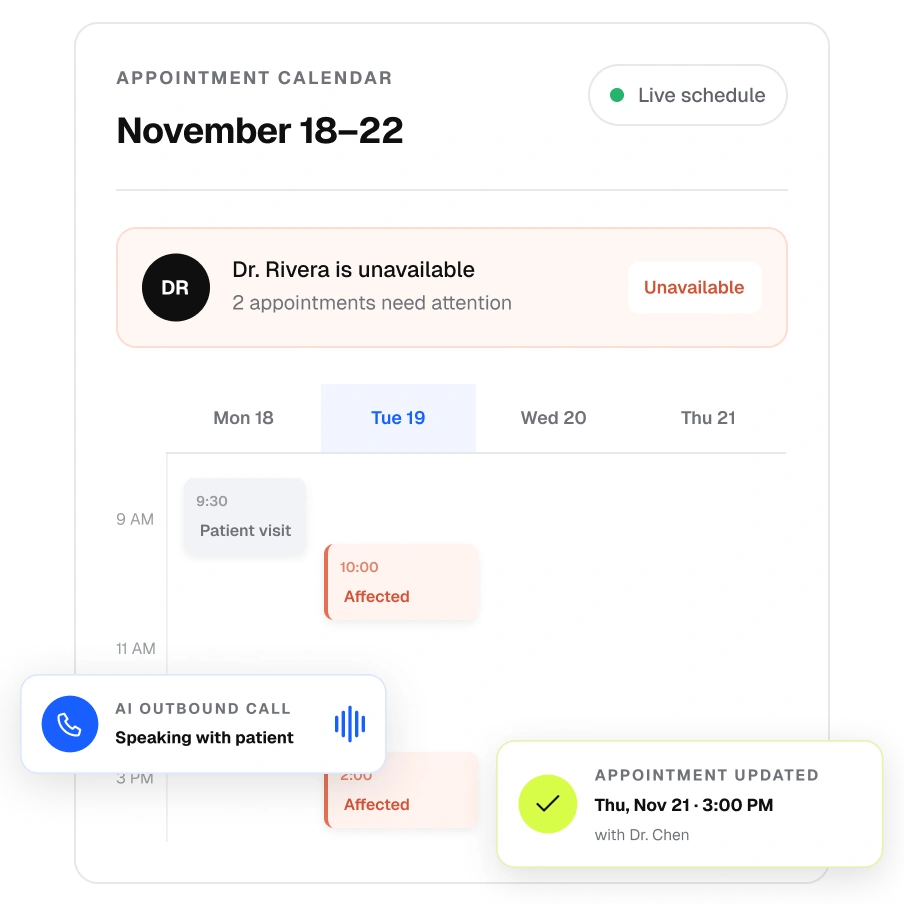
When a provider becomes unavailable due to vacation, emergencies, or schedule changes, Kickcall automates outbound calls to affected patients, communicates appointment changes, offers alternative providers and available time slots, and helps your practice coordinate rescheduling while reducing front-desk workload.
Book Free Demo

One Provider's Unavailability Can Disrupt an Entire Schedule

A single provider's absence can affect multiple appointments and disrupt your clinic's daily schedule. Front-desk teams must identify affected bookings, contact patients individually, find suitable alternatives, and keep appointment records updated.

Time-Consuming Patient Outreach

Staff spend hours calling patients with affected appointments.

Scheduling Delays

Finding alternative providers and available appointment slots requires additional coordination.

Missed Patient Communication

Patients who cannot be reached may remain unaware of appointment changes.

Appointment Cancellations

Patients may cancel when suitable alternatives are not offered promptly.

Additional Front-Desk Workload

Staff must manage rescheduling alongside their regular responsibilities.

How Kickcall Automates Appointment Rescheduling

From identifying affected appointments to coordinating new bookings, Kickcall helps manage the patient rescheduling process through automated outbound calls.

01

Identify Affected Appointments

Identify upcoming appointments associated with the unavailable provider through supported EHR/PMS integrations. Review affected dates, appointment details, and patient records to determine which patients need to be contacted for rescheduling.

Provider schedule
Unavailable
AR
Dr. Rivera
Provider schedule
Unavailable
November 20
2 Affected
10:00 AM
Sarah Jenkins
Affected
02:00 PM
Michael Brown
Affected

02

Trigger Automated Outbound Calls

Once affected appointments are identified, Kickcall automatically initiates outbound calls to the patients. Each call is triggered based on the provider's availability changes and the practice's configured outreach workflow.

Outbound AI Call
Initiated
Sarah Jenkins
Appointment Rescheduling

03

Inform Patients About the Change

Kickcall's AI receptionist explains that the patient's scheduled provider is unavailable and that their appointment needs to be rescheduled. Patients receive clear information about the change and guidance on choosing another appointment time.

Live call
Live
Kick
Call
Your provider is unavailable for your scheduled appointment. Would you like to explore another available time?
Yes, I’d like to reschedule.

04

Offer Alternative Appointment Options

Present patients with available appointment slots from alternative providers based on the practice's scheduling rules, provider availability, and appointment requirements. This helps patients explore suitable options without requiring staff to coordinate every call manually.

Alternative availability
Thursday
JL
Dr. James Lee
Thursday · 02:00 PM
Available
MP
Dr. Maya Patel
Thursday · 10:30 AM
Available
Alternative providers matching practice rules

05

Capture Patient Preferences

Allow patients to choose an alternative appointment time, request a different option, or ask to speak with the front-desk team. Kickcall captures their preferences and responses to help the practice coordinate the next scheduling step.

Patient Preference
Sarah Jenkins
MP
Dr. Maya Patel
Alternative provider
Thursday · 10:30 AM
Request another appointment time
Preference captured for the front-desk team

06

Update Appointment Records

Once a new appointment is confirmed, update the booking in the connected EHR/PMS when supported and configured. Record the updated appointment details and call outcomes so the practice can keep track of completed and pending rescheduling requests.

Appointment record
Sarah Jenkins
Appointment updated
Confirmed
Previous appointment
Wednesday · 10:00 AM
New appointment
Thursday · 10:30 AM
Provider
Dr. Maya Patel
Connected system
Record updated

Replace Hours of Manual Calls With Automated Rescheduling

Instead of having your front-desk team manually manage provider schedule changes, Kickcall automates patient outreach, communicates availability changes, and helps patients find alternative appointments.

BEFORE KICKCALL
Staff manually identify affected appointments.
Staff call patients individually.
Repeatedly explain provider schedule changes.
Search for alternative provider availability.
Track patient responses and appointment updates manually.
AFTER KICKCALL
Affected appointments automatically identified.
Automated outbound calls initiated.
Patients informed about provider availability changes.
Alternative providers and appointment times offered.
Patient preferences captured and call outcomes recorded.

Trusted by People Like You All Over the World

Dr. Matthew Chrycy
Itrust, Healthcare Industry
“Kickcall has transformed how we communicate with our patients and partners. The platform is incredibly reliable and easy to use, helping our team manage every call more efficiently. Its seamless workflow and intuitive features have improved patient engagement, strengthened team collaboration, and enhanced the overall patient experience. I highly recommend Kickcall to any healthcare organization looking to improve communication.”
Dr. Emily Parker
Toronto General Clinic, Healthcare
"Kickcall has significantly improved how we communicate with our patients at Toronto General Clinic. The platform is reliable, easy to use, and ensures every call is clear and efficient. Since adopting Kickcall, we've seen better patient engagement and smoother coordination across our team. I highly recommend it to any healthcare provider looking for a dependable and effective communication solution."

Integrations 100+ Tools

Kickcall ensures smooth data flow and collaboration.

Dentrix

AI voice receptionist for Dentrix practices

Curve Dental

AI Voice Receptionist for Curve Dental PMS Users

Denticon

AI Receptionist for Denticon: Every Call Answered, Every Appointment Booked in the Right Office

ABELDent

AI Voice Receptionist for ABELDent Users

Eaglesoft

AI Voice Receptionist for Eaglesoft PMS Users

DentiMax PMS

AI Voice Receptionist for DentiMax PMS

See All Integrations

Frequently Asked Questions

What happens when a healthcare provider becomes unavailable?

Can Kickcall automatically contact patients with affected appointments?

Can Kickcall update appointments in our EHR or PMS?

Can this workflow handle unexpected provider absences?

What happens if a patient doesn't answer the call?

Can patients reschedule with another provider?

Can patients request to speak with the front desk?

Compliance Certification

We have compliance certifications and protocols in place to ensure that every single interaction is private and secure.
Book Free Demo

Ready to Add AI Voice to Your Business with Kickcall?

Automate calls, handle more customers, and grow — with zero disruption to your current setup.

Icon

24/7 Call Handling

Icon

Multilingual Support

Icon

Live Call Transfer

Icon

Smart Appointment Booking

Icon

Auto-Sync Knowledge Base

Icon

AI-Powered Receptionist

Icon

Custom Integrations

Icon

Secure & Scalable

Icon

White-Label Ready

Icon

Analytics Dashboard

Icon

Spam Call Detection

Icon

Dedicated Technical Manager

Icon

AI Agent Builder

Icon

Real-Time Slack Support

Icon

VoIP-First Architecture

Icon

Customer Support

Icon

Workflow Automation

Icon

Data Security

Icon

Intelligent Scheduling

Icon

Advanced Reporting

Icon

Lead Scoring

Icon

Customer Support

Icon

Workflow Automation

Icon

Data Security

Icon

Intelligent Scheduling

Icon

Advanced Reporting

Icon

Lead Scoring